01 — a journal for your everyday life

make your
mark.

a private journal and ritual tracker. no account needed.

save the little moments. keep the rituals that matter. read your life back, on iPhone, iPad or any computer.

"Most apps help you manage your schedule. MARK helps you manage your life."
app store review · 5.0 from 8 ratings
7:12 am the sky follows your day

free to keep · iPhone, iPad and the web · no account needed

mark 2.4 · coming november 2026

02 — most days don't feel important

until they become
memories.

A quiet morning coffee. A family milestone. A new puppy. Little things rarely feel important in the moment; later, they're the ones you want back. Mark makes them easy to keep, and turns them into a story you can look back on.

the journal's home shows a different memory each time you come back

A memory on the journal's home: a lake at dawn, with a line from that morning
a year ago this week
“Coffee on the dock before anyone else was up.”oct 16, 2025 · the lake cabin
No families were photographed in the making of this website 🙈 Our pictures are AI-generated. Your life is the real masterpiece.

03 — everything in mark

one quiet place
for all of it.

coming soon — in november · mark 2.4

your day,
already half-written.

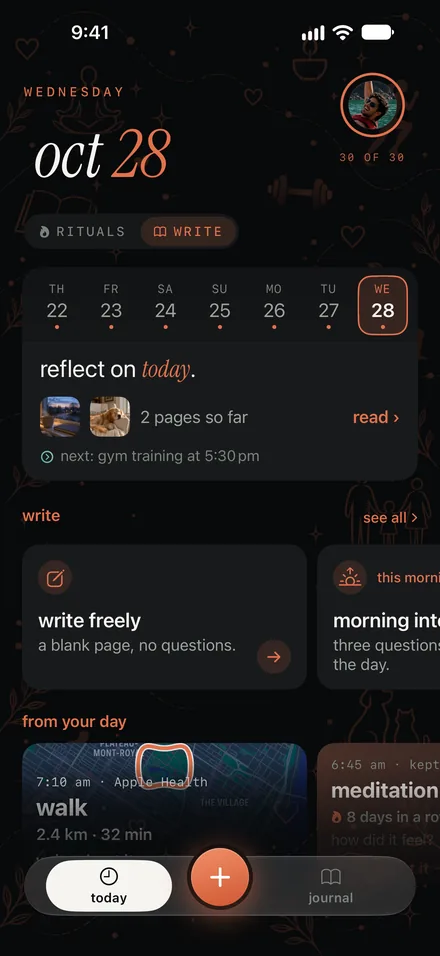
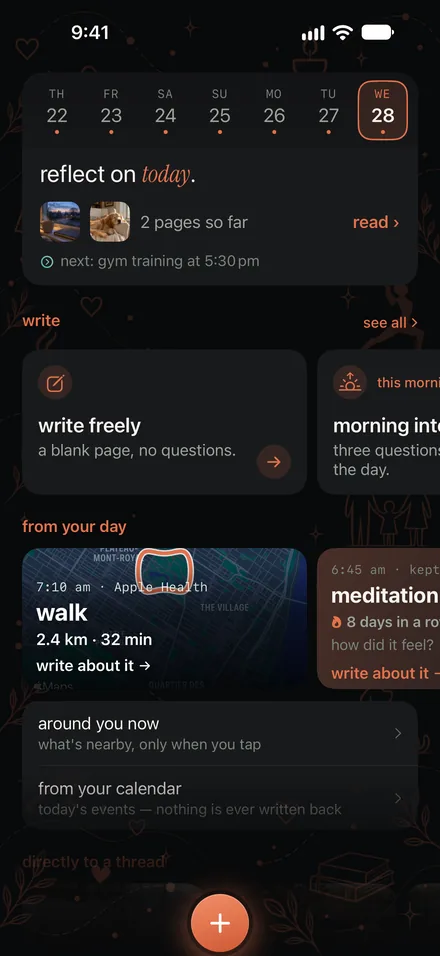
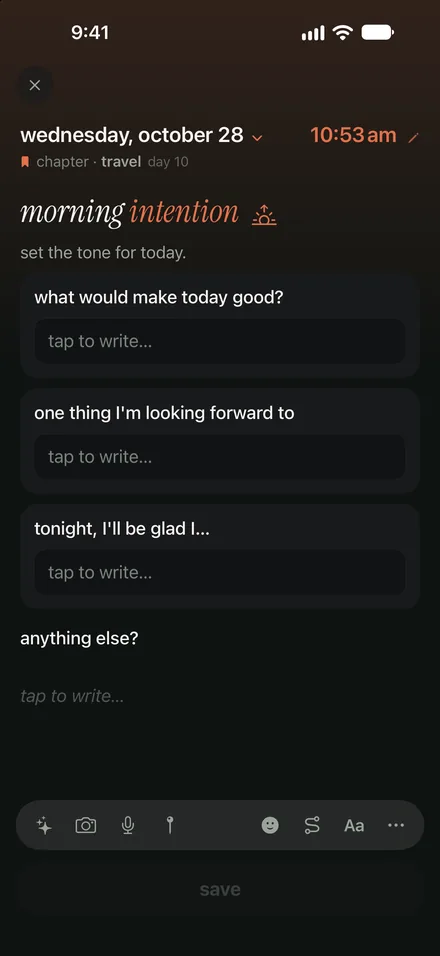
In 2.4 the write page gathers what today already holds: the rituals you kept, your morning walk on its map, the day's photos. Beside them, the ways in: a blank page, or three questions to set the tone.

Mark 2.4: the write page, with today's pages, the ways to write, and what today already holds
the write page
From your day: a morning walk on its map from Apple Health, and meditation, kept
from your day
A guided page: morning intention, three questions to set the tone for the day
three questions

04 — made yours

nine looks.
one of them is yours.

The same journal, dressed the way you like it. Every theme has its own paper, ink and accent.

Then make it yours: the sky at the top of Today takes the tint you choose, the accent is any colour you like, and the doodles behind the page change with the season.

the sky, in the tint you choose

05 — behind the scenes

sealed on
your phone.

Your journal lives on your iPhone and in your own iCloud. What reaches your computer is sealed on the phone first. Our server carries it, and can't read a word.

26days of 30
4returns
3chapters

nothing to break, nothing to lose — mark counts the days you showed up

on your phone
Two days without a single notification. We played cards until the light went.
what the server carries
…
writing

06 — on any computer, on iPad

your journal, anywhere.
still yours.

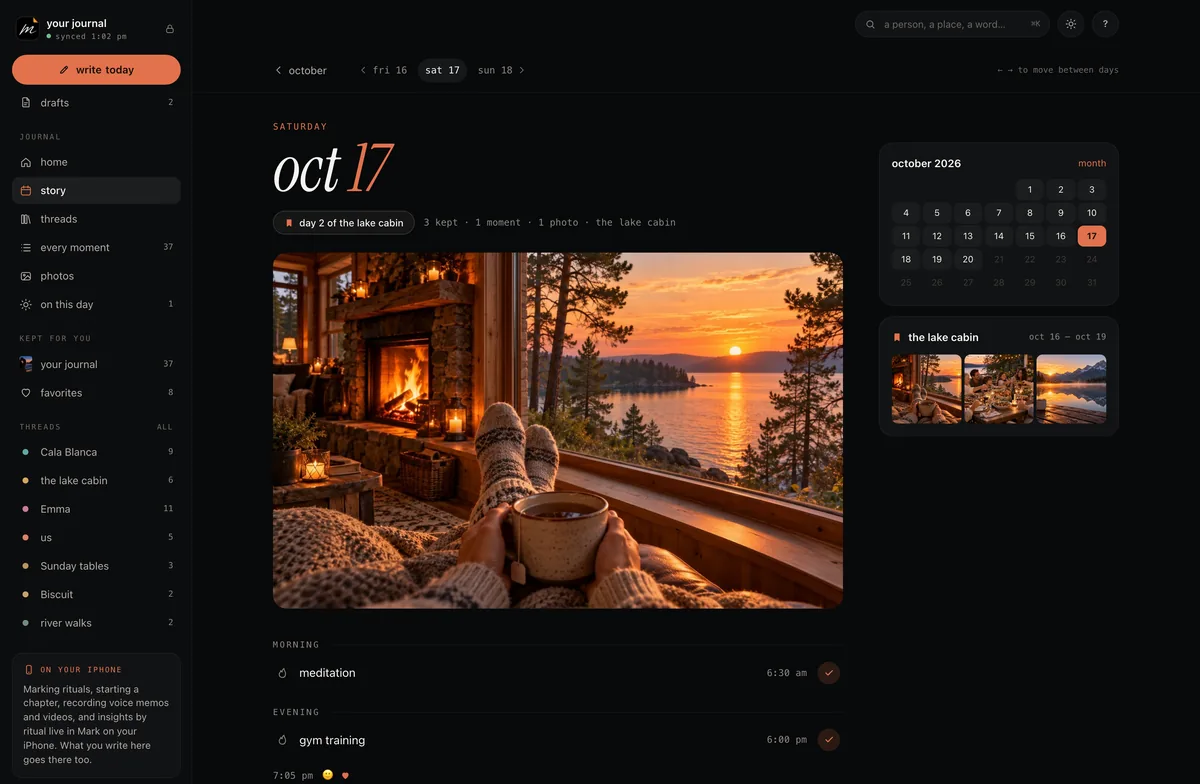
Go to markjournal.app/journal, scan the code with your iPhone, and you're in. No account, no password. On iPad, Mark opens up into columns: your day beside what's next, a chapter beside the timeline of every chapter you've lived.

The Mark web journal on a computer: a month as a calendar of photos, with chapters, threads and where you left off
Mark on iPad: chapters beside a timeline of every chapter

iPhone · iPad · the web · one journal · open your journal →

07 — coming from day one?

bring your journal
with you.

Years of writing shouldn't stay behind because you want a different app. Mark reads a Day One export and brings everything you wrote over.

  1. 01

    export

    in day one · export · json (.zip)

    In Day One, export your journal as a JSON .zip file.

  2. 02

    share it to mark

    share sheet → mark · or files → open in mark

    Open the file with Mark. Choose which journals come over; each one becomes a thread, and you can bring tags too.

  3. 03

    it's all there

    dates · words · photos · places · marked "from day one"

    Everything you wrote lands on its own day with its words, photos and places. Changed your mind? Take the whole import back out in one tap.

08 — plans

free to keep.
premium to go further.

Mark is free for as long as you like, with your whole history. Premium adds every photo, your voice, your other devices and the web.

free to keep, with no time limit. tap any premium feature, or open premium in settings, and you can try it free for 7 days.

free
$0

A whole journal on your iPhone, for as long as you like.

  • moments and tasks, unlimited
  • three rituals, one thread, one photo a moment
  • your whole history, searchable
  • places, maps and markdown
  • a daily question from your own days
Download free
premium
$39.99per year

or $5.99 a month

  • 30 photos a moment
  • voice memos, turned into words
  • every ritual, thread and chapter
  • on iPad, and the web journal
  • all prompt packs, themes and widgets
Get Premium in the app

Prices in US dollars; in Canada, CA$39.99 a year or CA$6.99 a month. Premium is billed through Apple and renews automatically until you cancel in Settings. Stop paying and you're on Free: nothing is deleted, and anything beyond Free's limits stays yours to read. Downloaded Mark before August 25, 2026? You keep everything you had, free.

good to know

questions, answered.

What is Mark?

Mark - Make Your Mark is a private journal app for iPhone, iPad and Mac, made by a small studio. Mark the rituals you keep (daily, weekly or monthly), write down the moments you want to remember, and each day becomes a page you can read again.

Is this the Mark highlighter's app, or Mark: Capture Your Moments?

No, those are other companies' products. Mark - Make Your Mark is the journal app made by a small studio. If you own the Mark reading highlighter, its app is Mark Bookmark.

Is Mark free?

Yes. The free plan is a whole journal on your iPhone, with your entire history, one photo per moment, three rituals, one thread plus your favourites, and a daily question. There's no time limit and nothing to cancel.

What does Premium add?

Up to 30 photos per moment, voice memos turned into words, the song and the day's walk or workout, unlimited rituals and threads, chapters, all seven prompt packs, insights across all your history, every theme and widget, and Mark on your iPad, on more than one iPhone and in the web journal.

How do I open my journal on a computer?

Go to markjournal.app/journal. Scan the code it shows with your iPhone's camera, and that browser is paired. (Or in Mark, go to Settings → web app → show a code, and type the six digits into the page.) There's no account and no password: your phone hands the browser the key. Next time, go to markjournal.app/journal and you're straight in; markjournal.app itself is always this site. You can add a four-digit passcode and have the page cover itself when you step away.

Can I bring my Day One journal?

Yes, on every plan. Export your journal from Day One as JSON, then open the file with Mark. Each Day One journal becomes a thread, your moments keep their dates, words, photos and places, and you can undo the whole import at any time. How it works.

Is my journal private?

Your journal lives on your devices and in your own iCloud, protected by Apple; if you turn on Advanced Data Protection for iCloud, it's end-to-end encrypted. There's no Mark account, no ads and no feed. If you turn on the web journal, everything is sealed on your iPhone before it's sent, and our server only ever holds locked boxes it can't open. Private threads open only with Face ID or your passcode. Read the privacy policy.

Do I need an account?

No. Mark keeps your journal in your own iCloud, so there's nothing to sign up for and no password to remember. Even the web journal pairs with your iPhone by a code, not a login.

Can I lock Mark with Face ID?

Yes, on every plan. Turn on app lock in Settings and Mark asks for Face ID or your passcode each time it opens, and covers itself when you switch apps. Private threads ask for Face ID or your passcode too.

What happens if I stop paying?

You move to the free plan. Nothing is deleted and nothing is locked away: every moment stays readable, and anything above Free's limits, extra photos, rituals, threads, stays yours. You just can't add more beyond the free limits.

I downloaded Mark before August 25, 2026. What changes?

Nothing you had is taken away. You keep the whole app, free, as it was, and your history is no longer trimmed to 14 days. A few things that are new in 2.0, like 30 photos per moment and voice transcripts, are part of Premium.

Does Mark work on iPad and Mac?

Yes. It's the same app, laid out in columns for the bigger screen, and it runs on Macs with Apple silicon too. Everything syncs through your iCloud. Using Mark on more than one device, an iPad or a Mac beside your iPhone, is part of Premium.

Does Mark use AI?

No. Mark has no chatbot and doesn't use AI to read or write your journal, and your journal is never sent to us or to anyone else to be read. Voice memos are turned into words on your iPhone itself; the recording is kept with your journal, in your own iCloud, like your photos.

Can I share Premium with my family?

Yes. Premium subscriptions work with Apple Family Sharing. The lifetime purchase is just for you.

Can I take my journal with me?

Yes, on every plan. Export your whole journal whenever you like, as Markdown or as a ZIP with your photos, voice memos and a JSON copy for other apps.


Something else? Visit support or write to hello@markjournal.app.

you'll remember.

Little things, kept, become a story. Start with one moment today.

Download on the App Store how mark started — read the story →